Qiyuan Studio

Explainer video studio讲解视频工作室

Expert knowledge, turned into finished video.

把专家的知识,
做成剪好的成片。

Specialists send us a draft script. We return an edited lecture, made with a production pipeline we built on Claude, and every step is checked by a person.

专业人士交给我们一份讲稿,我们交回一集剪好的讲解视频。背后是一条用 Claude 搭建的生产流水线,每一步都有人把关。

hi@qiyuan.page  →

Fig. 1A court opinion turns into view and the key passage is highlighted. One module of our editing tool, rendered in DaVinci Resolve. 图 1判决原文翻转入画,关键段落高亮。这是我们剪辑工具里的一个模块,在 DaVinci Resolve 中渲染。
01Work作品

Selected work

作品

Fig. 2Excerpts from Lecture 8, The Participants. 图 2第八讲《参与者》片段。

Section 337, a lecture series

337 调查系列讲座

A 30-episode series on U.S. patent law and Section 337 investigations at the U.S. International Trade Commission, made for a U.S.-based intellectual property law firm. The firm writes the scripts. We turn each one into a vertical episode with a presenter, the original statutes and court documents on screen, chapter markers and bilingual subtitles.

为一家美国知识产权律所制作的 30 讲系列,内容是美国专利法和美国国际贸易委员会的 337 调查。律所写讲稿,我们把每一讲做成竖屏成片:讲者出镜,法条和判决原文上屏,配章节进度和中英双语字幕。

Legal statements are checked against the original sources before the edit, and the client approves every script.

剪辑之前,法律表述先对照原始出处核实,每一版讲稿都经客户确认。

Client客户
U.S. IP law firm美国知识产权律所
Format规格
Vertical, 1080×1920, Chinese narration with English subtitles竖屏 1080×1920,中文讲解,英文字幕
Status进度
8 of 30 episodes, ongoing已到第 8 讲,共 30 讲

DaVinci Tool

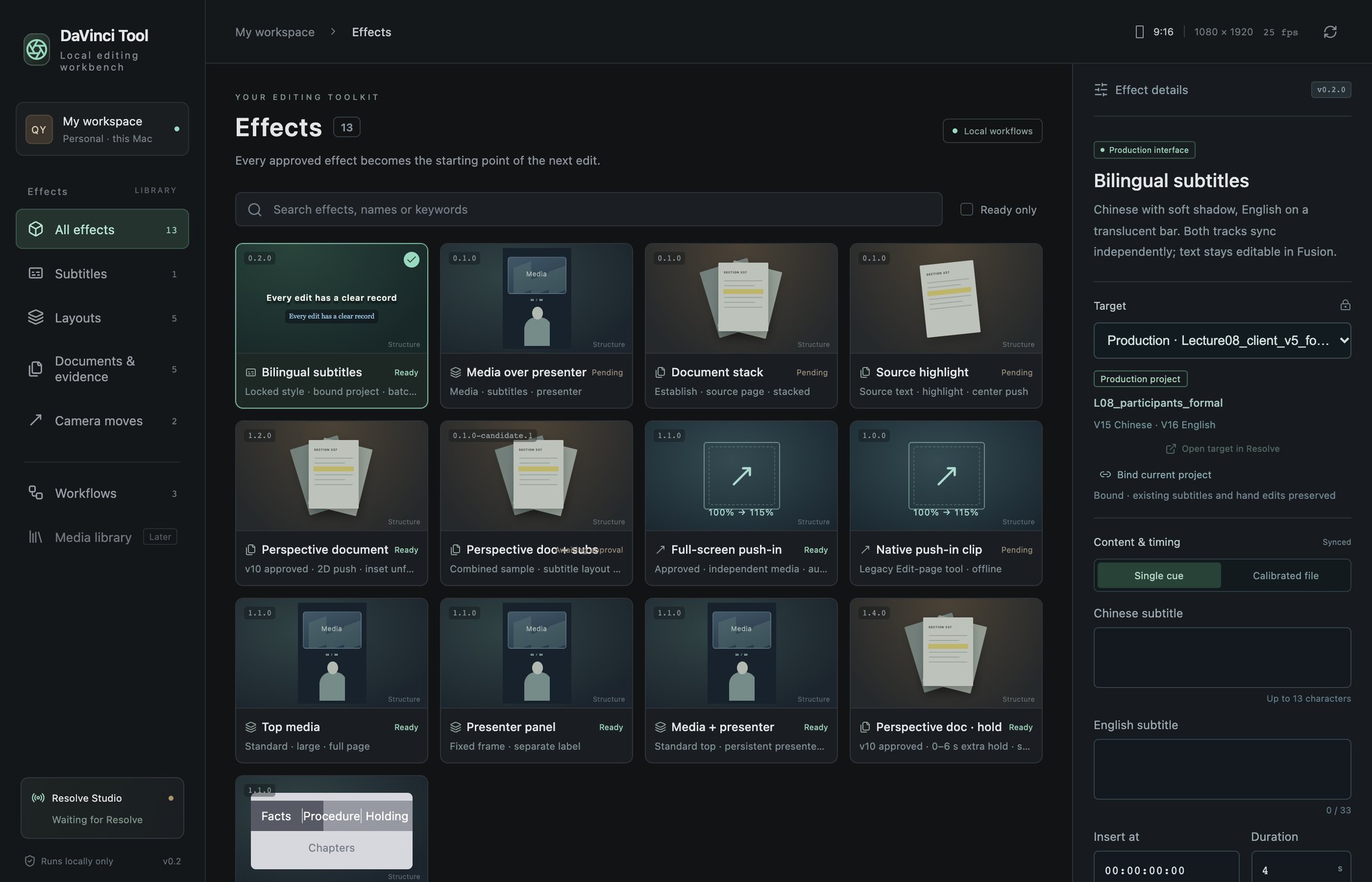
Our own editing tool, built with Claude Code. It drives DaVinci Resolve through its scripting API from a library of versioned effect modules: bilingual subtitles, document highlights, presenter layouts, chapter bars. An effect joins the library only after a person has approved it on a real episode. After every change, the tool reads the timeline back to confirm the change is really there.

我们自己的剪辑工具,用 Claude Code 开发。它通过 DaVinci Resolve 的脚本接口,调用一套带版本号的效果模块:双语字幕、文件高亮、讲者版式、章节进度条。效果要先在真实剪辑里被人确认,才会进效果库。每做一次改动,工具都会回读时间线,确认改动确实生效了。
DaVinci Tool effect library
Fig. 3The effect library. Ready modules have been approved on a real episode; Pending ones are still awaiting approval. 图 3效果库(界面英文版)。「Ready」是已在真实剪辑中确认的模块,「Pending」是还在等确认的。
02Process流程

From draft to delivery

从讲稿到交付

Each stage saves its result before the next one begins. Client feedback goes back to the edit, never straight into the delivered file.

每一步先保存结果,下一步才开始。客户的意见回到剪辑这一步,不会直接改交付文件。

I

Script

讲稿

Claude rewrites the draft for speaking and flags every claim the expert should confirm. The original is never edited in place.

Claude 把原稿改写成口播稿,并标出每一处需要专家确认的说法。原稿始终保持原样。

II

Voice & presenter

配音与出镜

Narration in the client's chosen voice, then a presenter video driven by that audio.

用客户选定的音色生成配音,再用这段音频驱动讲者出镜视频。

III

Edit

剪辑

DaVinci Tool assembles the timeline: layouts, source documents, b-roll, subtitles and chapters.

DaVinci Tool 拼出时间线:版式、原始文件、空镜、字幕和章节。

IV

Review

审稿

The client comments on a shared review page, and changes go into the next cut.

客户在共享审稿页上批注,修改进入下一版。

03Principles原则

How we work

我们怎么做事

People approve, machines repeat

人来确认,机器来重复

Nothing is automated until a person has approved how it looks. Whatever hasn't been approved stays manual.

效果先经人确认,才会自动化。没确认过的,继续手工做。

Hand edits are protected

手改的地方不覆盖

If an editor has changed something by hand, the tool stops, lists the differences and waits for a decision.

剪辑师手动改过的地方,工具会停下,列出差异,等人决定。

Every step is on record

每一步都可回查

Script versions, sources and edit runs are all kept. A change counts as done only after it has been checked.

讲稿版本、出处和每次剪辑操作都留存。改动经过核实,才算完成。